ลูกค้าของคุณอยู่บน LINE — ทุกคนรู้เรื่องนี้ แต่สิ่งที่หลายธุรกิจยังทำอยู่คือ ทีม customer service เปิด LINE OA อยู่หน้าจอหนึ่ง และเปิด CRM หรือ ERP อยู่อีกหน้าจอหนึ่ง แล้วก็ copy-paste ข้อมูลไปมาตลอดวัน
นี่คือสัญญาณชัดเจนว่าถึงเวลา integrate LINE OA เข้ากับระบบหลังบ้านแล้ว
LINE OA Integration คืออะไร?
LINE Official Account Integration คือการเชื่อม LINE OA ของธุรกิจคุณเข้ากับระบบ backend ผ่าน LINE Messaging API เพื่อให้:
- ข้อมูลลูกค้าที่คุยใน LINE sync อัตโนมัติเข้า CRM
- ระบบส่งแจ้งเตือนอัตโนมัติผ่าน LINE เมื่อเกิด event ใน ERP (เช่น สินค้าพร้อมส่ง)
- chatbot ดึงข้อมูลจาก database มาตอบลูกค้าได้ real-time
- ทีม support เห็น context ของลูกค้าทั้งหมดในที่เดียว
Use Cases ที่ธุรกิจไทยใช้จริง
1. LINE OA เชื่อม CRM
สถานการณ์: ลูกค้า inbox มา LINE OA ทุกครั้งที่คุยจะมี record ใน CRM อัตโนมัติ ทีม sales เห็น chat history, deal stage, และ contact info รวมกันในหน้าเดียว
ประโยชน์: ไม่มี lead หลุด, ทีม sales follow-up ได้ทันที, handover ระหว่าง agent ราบรื่น
2. Order Status แจ้งเตือนอัตโนมัติ
สถานการณ์: ลูกค้าสั่งสินค้าผ่าน website → ระบบ ERP หรือ OMS อัปเดต status → LINE แจ้งเตือนอัตโนมัติ: "ออเดอร์ของคุณกำลังจัดเตรียม...", "สินค้าคุณออกจากคลังแล้ว...", "พนักงานส่งกำลังเดินทาง..."
ประโยชน์: ลด inbound "เช็ค tracking" จาก customer ลง 50–70%, customer experience ดีขึ้นมาก
3. Customer Self-Service via Chatbot
สถานการณ์: ลูกค้าถามผ่าน LINE → chatbot ตรวจสอบ order, invoice, หรือ appointment จาก database แล้วตอบกลับ real-time ทีม support เข้ามาเฉพาะกรณีที่ chatbot ตอบไม่ได้
ประโยชน์: ลด support ticket 40–60%, รองรับ inquiry ได้ 24/7 โดยไม่เพิ่มคน
4. Broadcast ที่ Personalized
สถานการณ์: แทนที่จะ broadcast ข้อความเดียวกันหาทุกคน ระบบดึงข้อมูลจาก CRM เพื่อส่ง message ที่ personalized ตาม segment: ลูกค้า VIP, ลูกค้าที่ยังไม่กลับมาซื้อในรอบ 90 วัน, ลูกค้าที่มีออเดอร์ค้างชำระ
Architecture: ระบบทำงานอย่างไร?
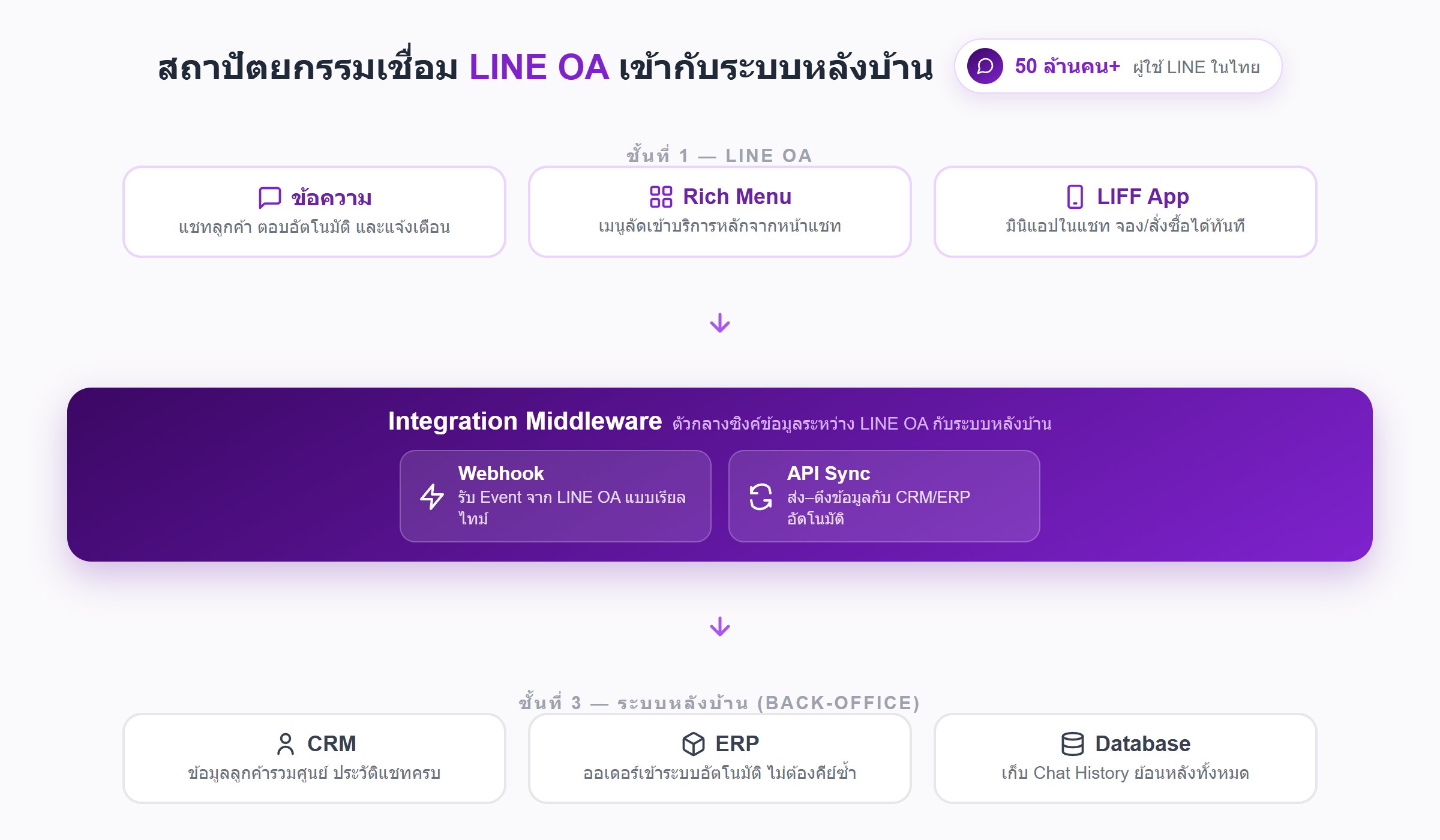 LINE Messaging API ทำงานผ่าน webhook รูปแบบพื้นฐานคือ:
1. รับ Event เมื่อลูกค้าส่งข้อความ → LINE ส่ง event payload มายัง webhook URL ของคุณ ซึ่งเป็น server ของคุณเอง event นี้มี LINE User ID, message content, timestamp
2. Process Server ของคุณรับ event แล้ว: ดึงข้อมูลลูกค้าจาก CRM, ถามข้อมูล real-time จาก ERP, หรือส่ง message ไปยัง human agent
3. Reply ส่ง reply กลับไปยัง LINE ผ่าน Messaging API สามารถส่งเป็น text, rich message, quick reply button, หรือ Flex Message (UI component custom ได้)
สิ่งที่ต้องเตรียมก่อน integrate
1. LINE Official Account Verified ต้องเป็น Verified Account (โล่สีน้ำเงิน) เพื่อใช้ Messaging API อย่างเต็มที่ และลูกค้าเชื่อถือมากกว่า
2. LINE Developers Account สร้าง channel ใน LINE Developers Console เพื่อรับ Channel Access Token สำหรับ API authentication
3. Server หรือ Cloud Function ต้องมี server ที่รับ webhook จาก LINE ได้ (public HTTPS endpoint) เป็น Node.js, Python, หรือ PHP ก็ได้
4. CRM หรือ Database ที่มี API ระบบ backend ของคุณต้องมี API หรืออย่างน้อย database ที่ query ได้ เพื่อให้ LINE integration ดึงและบันทึกข้อมูลได้
ข้อควรระวัง: PDPA และ Privacy
เมื่อเก็บข้อมูลผ่าน LINE ต้องระวัง:
- ขอ consent ก่อนเก็บข้อมูล personal — แม้แต่ LINE display name ถือเป็น personal data ภายใต้ PDPA
- แจ้ง privacy policy ให้ผู้ใช้ทราบเมื่อ add เป็นเพื่อน
- จำกัด retention period ข้อมูลที่ไม่จำเป็นแล้วต้องลบตาม policy
สรุป
LINE OA Integration คือ investment ที่คุ้มมากสำหรับธุรกิจไทย เพราะ channel นี้คือที่ที่ลูกค้าของคุณอยู่อยู่แล้ว การเชื่อมกับระบบ backend ทำให้ทีมทำงานได้เร็วขึ้น ลูกค้าได้รับประสบการณ์ที่ดีขึ้น และธุรกิจ scale ได้โดยไม่ต้องเพิ่มคน
ทีม Adowbig มีประสบการณ์ integrating LINE OA กับระบบ CRM, ERP, และ custom backend ให้กับธุรกิจไทยหลายราย ติดต่อเราเพื่อวิเคราะห์ use case ของคุณโดยไม่มีค่าใช้จ่าย